I like the IndieWeb; it’s an idea and emerging set of standards for how to build independent websites that can talk to one another. I’m gradually building this website towards that ideal. One of the underlying ideas is POSSE (Publish on your Own Site, Syndicate Elsewhere) or COPE (Create Once, Post Everywhere).
The basic idea behind POSSE is that content should be posted to my own site first then syndicated elsewhere, with links connecting back to my original post. Why do I prefer this approach?
My site already does some syndication: I have an RSS feed for my blog, which is a stripped down feed of my posts. You can use a dedicated app (RSS reader) to subscribe to that feed. Your app will regularly check my site for new posts and present them to you without you having to come here. RSS does syndication brilliantly, but it has its limitations: for example, you have to know about the existence of the feed and use an app to subscribe.
Social media sites are a great environment for sharing and interacting with other users. You contribute to shared feeds of content, and can share posts to people connected with you. If RSS is one-to-many communication, social media is many-to-many. The problem with traditional social media is that you end up locked in. You can request your post data from Facebook or LinkedIn, but you’ll end up with a massive JSON file that’s unwieldy to use. By syndicating content from my site to social media, I can write in a central place and share my thoughts and ideas in community spaces. I own the content, in a format I can work with, and can take it anywhere. It’s backed up on Github and my hard drives. It’s a way of treating my writing as something I own.
POSSE is a practice, so you could do it manually. But, if I plan on syndicating the same post to Mastodon, Bluesky, Twitter/X, and LinkedIn, I would be adjusting a summary and pasting links into forms on each social media site. And if you repeat the same step enough times, it looks like an opportunity to automate with a script.
This post is a write-up of the ideas behind the script. The process was a little more creative and messy, working with docs and LLM assistants to build out something that met my needs. I’ll talk about the final script and using it in my next post in this series.
Targets, tools, and research
This site is built using Hugo. Hugo is a static site generator, and it builds HTML from markdown files stored locally on my computer (version controlled with Git/GitHub). Information about the post (metadata) is stored as front matter: YAML or TOML before the markdown content. The front matter can include labels, descriptions, whether the post is a draft, etc. Some of these terms are reserved by Hugo, but you can define other kinds of metadata. So I’ll create a post, with metadata, and build the website using the post metadata.
I’ve used various scripts to take care of various command line checks, cleanups, and repeated commands for working with markdown and this site. After I build the site, I use the command-line to deploy it to my hosting service.
The POSSE script runs after I build and deploy this site to syndicate the content. I decided to focus in particular on micro-blogging social networks, so I will author a single short summary or description for the post (including hashtags). By keeping the post close to the blogpost, I can write the “tweet”/“skeet”/“toot” as I write and publish new blog posts.
Aside: Mentions (using the
@symbol) pose a wrinkle that I don’t want to tackle at this early stage. Especially in federated services, where a Mastodon handle is different from a Bluesky handle. The easiest way is to log in and leverage mentions directly.
Here’s the core logic for the script:
- Scan a directory of content from my site for posts that I want to syndicate.
- If a post contains appropriate front matter (character length, whether I want to syndicate the post), add the post to a manifest (dictionary or list) of things to syndicate, and reconstruct the URL for the equivalent post (each entry is a post + link).
- Verify that manifest links are live on my hosting service (ping the URL, receive a
200 OKresponse). - Create a session with the target service(s).
- Send posts to those services including a link to my original content.
- Update the front matter to prevent the script from posting the same content multiple times.
For now, I’m only to targeting federated social media: Bluesky and Mastodon. Why these two services? They’re the easiest to interact with via scripts. Twitter/X’s API is significantly more locked down than it used to be. LinkedIn has a very different kind of post structure that performs better and I don’t really want to deal with managing OAuth (yet). But ATProto and ActivityPub are open standards for developing and working with social media. The more closed ecosystems could be future goals for this project.
Implementation considerations
Here are a couple of technical considerations I had to keep in mind:
-
Since I use Cloudflare, there’s a time gap between running the commands that deploy my site, and the content becoming available. I have to account for this when I run the script or combining the build, deploy, and syndicate steps into a larger script.
If you’re really gung-ho about CI/CD, then there’s ways of doing this via GitHub Actions or Hugo Pipes. This feels like over-engineering for this site. The difference between merging a branch and running my build/deploy scripts locally is negligible for me.
-
Dependency management was another factor. Since I script in the most recent version of Python (3.13.2), I needed to be mindful of potential library conflicts or version mismatches in the environment.
-
To securely handle keys and other credentials, I needed to be mindful of my Hugo site structure and Github. Rather than store these keys in my site configuration, the script uses a
.envfile, which I explicitly tell Git to ignore. -
Hugo uses the base URL for your site, individual markdown file names, leaf bundles, and metadata to set the URL of pages. I needed to accommodate this as well.
Bluesky
I’ve talked a little bit about learning about ATProto in the past, which is the protocol that Bluesky is built on. There is an SDK for Python.
The core thing to know for this implementation is the client object, that lets you interact with the Bluesky programmatically. In order for your application/script to authenticate with the Bluesky server, you need to generate an application password. After authenticating and creating a client, you can use the send_post(...) method to create a post.
Bluesky posts have a “link card”, which requires a specific data structure called an Embed. Embeds include a title, description, url, and thumb. Here’s how this looks on Bluesky itself:
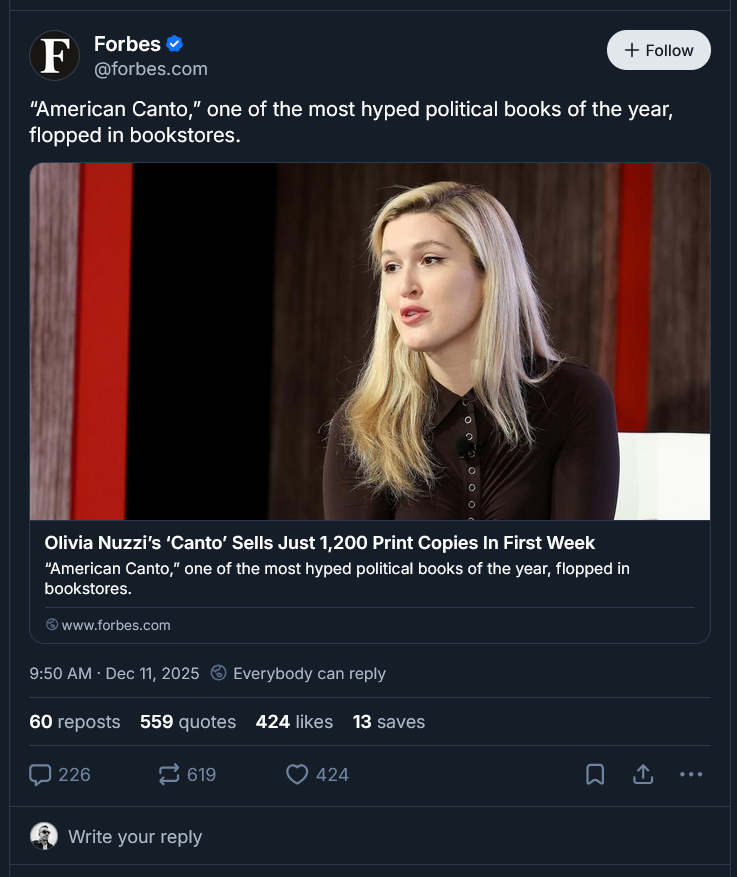
As nice as thumbnail images are, they are optional. So for simplicity, I omitted the thumb field in my implementation. This meant my link cards will end up looking blank, but an option is having some kind of logo for my personal brand and using that as a default, which I might implement later.
A key thing to note is that post content is limited in character length. For Bluesky, this is 300 characters, so we’ll want to be aware of this when scripting.
After creating the embed from my metadata, I use the send_post(...) method mentioned above. This method can return the URL and content ID for the post. Right now, I’m not doing anything with what’s returned, but I might want to write it to custom metadata for the post. So there’s two future features for this script!
Mastodon
Mastodon also has a Python library, and you can create a client (using an access token generated in the application). In a sense, it’s easier to work with the Mastodon library in that their servers handle the construction of the link cards/previews on the app. The library provides a similar client object. The client.status_post(...) lets you provide a status (body text, including the URL) and visibility (whether the post should be public, unlisted, or private).
Here’s an example of what a linked post looks like on Mastodon:
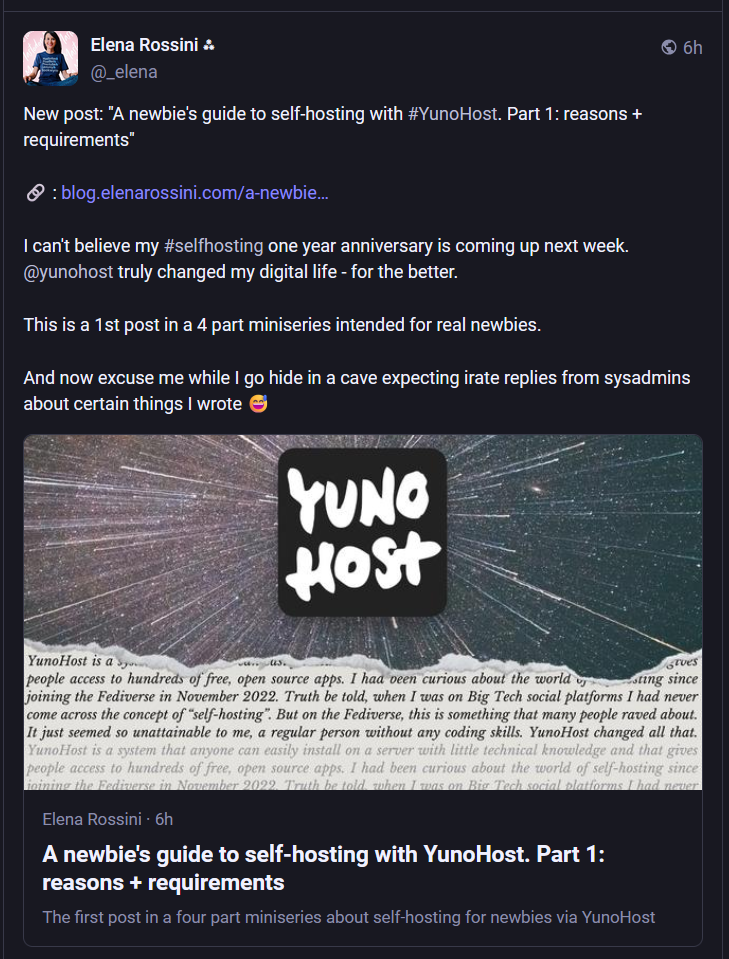
Again, it’s possible to post images/media to Mastodon, but my goal is quick syndication, so this isn’t something I want to handle with the script. Similar to Bluesky, the method returns a dictionary that includes the post ID and URL. Again, a stretch goal is to write this to the post metadata. Finally, Mastodon has a longer character limit of 500 characters — however, I don’t feel like I lose anything by forcing myself to stick to the 300 character limit from Bluesky. Also, the URL is part of the post in Mastodon (something to keep in mind if you’re developing on your own!).
Structure and setup
When I was programming in high school, I thought pseudocode was kind of silly. But it really helps to map out the overall logic and methods I’ll need to keep myself organized. And it speeds up developing with Gemini or ChatGPT if you already have a sense for the core logic. If I start with a plan for the script’s logic, going to an LLM lets me finish the project much more quickly.
So here’s a mockup, using some templates from other scripts I’ve used to work with markdown, YAML, or TOML. It translates the concepts from the steps I wrote earlier into blocks for methods, loops, and if statements:
# Import block - need to add atproto/mastodon, probably other libraries.

# Configuration block - constants, retrieving keys, logging etc.

# Methods
	# Content handlers YAML, TOML.
	# Syndication functions, create sessions, etc.

def main()
	#0. Use argparse for input.
		# Need directory to crawl
		# Optional testing mode.
        # Mode for testing clients?

	#1. Create clients (Bluesky, Mastodon)

	#2. Parse directories
		# Walk through directories, find each markdown file
			# If applicable
            #   Extract front matter,
            #   Add to manifest.
            # else end

	#3. Execute steps
		# Loop through manifest
			# Extract URL and ping
			# Syndication/Test output
				# Update front matter to indicate as syndicated.

if __name__ == "__main__":
    main()
I wanted the script to be agnostic on YAML or TOML (Hugo supports both for front matter), which means that the content handling logic needs to process both. That’ll complicate the method structure a little bit. Just like the leaf bundle vs. markdown filename point.
One realization I’ve had while writing this up is that it would be relatively easy to build something that doesn’t use links. I could add a
postsdirectory to my site, and point this script at that directory to publish posts. These could be backed up on Github, left withdraft: trueand syndicated without being posted to my website.It would also be a short hop to use this script with a tool like Obsidian, which makes use of markdown and front matter for note-taking. This lets you write and plan posts from your note-taking app, and Obsidian could become a home base for sharing and posting to multiple social media sites. Applications like this are why coding is fun and empowering!
On the topic of front matter it’s easy to map out new fields: I need a way to indicate which targets the script should syndicate to, what the content should be, and whether the post has been syndicated. While targets was my first choice, Hugo reserves the target keyword for link attributes (like target="_blank"). Using syndicate_to avoids any potential namespace collisions and makes the intent of the field explicit.
Here’s what my proposed front matter looks like in YAML:
---
title: "Syndication System Test"
date: 2024-01-01T12:00:00
draft: false
slug: "stealth-test-1"
syndicate_to: ["bluesky", "mastodon"]
microblog_content: "Testing my new syndication script. 🤖"
syndicated: false
---
Next up, we’ll set up the .env file. I’m going to include the BASE_URL for my site here, so I don’t need to load both the .env and Hugo config.toml. This might be a little sloppy, but I don’t anticipate changing domains any time soon:
# Site Configuration
#No trailing slash!
BASE_URL=https://www.yoururl.com

# Bluesky Credentials
# Use an App Password, not your main login password!
# Settings -> Privacy & Security -> App Passwords

BSKY_HANDLE=handle.bsky.social
BSKY_PASSWORD=xxxx-xxxx-xxxx-xxxx

# Mastodon credentials

MASTODON_API_BASE=https://mastodon.social
MASTODON_ACCESS_TOKEN=long-string-of-characters
Finally I told Git to ignore the .env, adding the following block to my site’s .gitignore:
# Environments
.env
.venv
env/
venv/
__pycache__/
Conclusion
This is a good stopping point for this post — I wanted to give a bit of the theory before publishing the final project. Coding can be kind of mysterious, and it’s helpful to show how you can get a good structure going for your ideas.
This script already works, and this is the first post I’ve syndicated using this approach. My next post will talk about some of the difficulties that emerged in building the script and a link to a github repo to so that you can use it with your own website. Hopefully this inspires you to work on something cool yourself!