While I’ve been looking for my next professional thing, I’ve been working on a community organization side project. The idea is to support a community group with recurring events, allowing people to come together to share skills, knowledge, and build relationships. Ordinary human being stuff.
But if you’ve been following my blog, you know that I have an opinionated view on social media. I’m begrudgingly planning on using Instagram to reach people, but I think that organizers and communicators should build things that are independent of major platforms. This lets you pick up and take the resources elsewhere if you need to. And when it comes to distributing information, I like platforms where people can subscribe and control how they get updates — where users pull rather than receive. This means I’m not responsible for adding or removing subscribers. You’re responsible for subscribing and filtering as a user.
Meetup is not my favorite platform, though it’s widely used. Luma is pretty widespread in the tech community in my area. Eventbrite is also a possibility.
But I enjoy using Hugo, and I’ve already built a script that lets me syndicate blog posts to Bluesky and Mastodon. Building an events calendar in a Hugo site is a natural next step.
Caution! This is written for an intermediate Hugo user. You don’t have to be an expert, but I’m going to move through some details without explaining everything at a beginner level. I’m hoping that this will land with people who like building with static site generators. If there’s interest for an intro to Hugo post, let me know?
Static site generators and iCalendar
Hugo is a static site generator. It takes markdown files (with metadata stored as “front matter” before the content) and generates folders, HTML, and XML that make up your website. It’s inexpensive to host and deploy the website, since a visitor is only requesting text and image assets when they visit your site (and maybe some JavaScript). It’s quick and (relatively) simple. Most importantly for this project you can define custom output formats that pull data from the front matter of your markdown files.
iCalendar (Wikipedia and the spec) is a standard format for calendar entries. Like most things on computers, .ics files can be viewed in calendar apps or as plain-text files. Hugo supports the ability to build to custom output formats. Using Google Calendar, Outlook, Thunderbird, or the MacOS calendar app, you can subscribe to URLs that regularly post events. It’s kind of like RSS in this respect.
Using Hugo, I can post all of the following things whenever I plan an event:
- A blog post with key event details.
- A corresponding
.icsfile so attendees can download the event information and add it to their calendar. - A corresponding RSS feed for my calendar posts, so followers can know when new events are added to the website.
- A corresponding
.icscalendar file, so people can subscribe to the calendar and receive updates in their personal calendars. - Bluesky and Mastodon posts, using my POSSE script.
This is a low cost way of getting one-to-many communication where users can opt in and out without having to worry about maintaining a mailing list. If I’m using Canva for promotional images for Instagram, I can store the instagram text and images in the same project folders (Hugo page bundles). The website becomes the source of truth for everything I’m doing to coordinate events. When I want to promote the event, I can share a QR code for the individual event pages.
The only part it’s missing is tracking attendance and interest. This is not something a static site is particularly well suited to doing. My plan for this is to use some kind of third party form service and monitor engagement with social media accounts. Keeping data collection minimal means that it’ll be easier for me as an organizer — no user accounts or mailing lists to maintain.
Some technical details
Hugo uses Go as its templating language. I wouldn’t consider myself a Go developer, but the syntax isn’t that difficult. We’re mostly going to be referencing variables in template files. This lets Hugo build output from your markdown content.
There are a couple of important technical details that we need to keep in mind about the ICS spec before building this out:
- Whitespace is structurally significant: In Hugo, it’s tempting to strip all the whitespace in files to keep things small. In iCal files, properties like
BEGIN:VEVENThave to start on fresh lines. - Timezones: Calendar apps expect timezones in UTC (with the Z suffix), so when I’m setting up the templates and creating event content, I will want to add a validation script that ensures I have valid date-times.
- Stable UIDs: Hugo has a value called
.File.UniqueIDthat lets me call the UID based on the content file. This way, when I rebuild the calendar, subscribers won’t end up with duplicates for each rebuild.
Implementation details
That’s the big picture, now I’m going to get into the details, starting with how I plan on structuring content for the website, defining site level configuration features, and the custom elements that are necessary to make this work.
Content structure
First, I needed to create a dedicated branch in my content directory. I used a branch bundle (_index.md) file to apply specific metadata across the entire section, including my new output type:
---
title: "Upcoming Events"
outputs:
	- HTML
	- RSS
	- ICS
---
By default, Hugo can output RSS for sections of your site, but it doesn’t have templates or resources for creating ICS files. To do this, we’ll have to add the output type to the site level configuration, and create template files.
Custom outputs and configs
Your sitewide configuration is typically handled in hugo.toml or config.yaml. To add ICS:
[outputFormats]
	[outputFormats.ICS]
		mediaType = "text/calendar"
		baseName = "events"
		isHTML = false

[outputs]
	section = ["HTML", "RSS", "ICS"]

[minify.tdmt]
  "text/calendar" = false
The media type format is important! This [outputFormats.ICS] block tells Hugo to build the file with metadata in a way that won’t confuse browsers. You need to add the baseName to ensure that the format picks up the right resources. I also added a line to my config to prevent minification for the ICS type. Minification reduces the size of files to make things more streamlined for machines, but this can cause problems with the ICS file type
Archetypes
Archetypes are used by Hugo as a template for new content files in a category. If I add an events.md file to my archetypes folder in the project directory, the hugo new events/{event-name}/index.md command will generate a markdown file from that archetype.
This lets me standardize the metadata for new event posts to my website, and start filling in the content for an event page:
---
title: "QFC {{ replace (replace .Name "-" " ") "qfc" "" | title }}"
date: {{ .Date }}
event_date: {{ .Date }}
event_end: {{ .Date }}
location: "TBD"
is_virtual: false
---

### Event Details
* **When:** {{ .Date | dateFormat "Monday, Jan 2, 2006" }}
* **Where:** {{ .Params.location | default "TBD" }}
For the title parameter, I have a replacement block that’s using the acronym for the project that I have in mind. The other parameters are filler that will be generated by Hugo. After running the hugo new events/{title}.md command, I’ll need to change the event_date and event_end values to those for my event, since currently I’m filling that with the current date. As I noted, it is important to handle timezones carefully! When updating the date fields, we need to be sure to include my timezone offset -05:00, so I can handle that with the Hugo build process.
If I write a validation script, I can specify my timezone, and check both
event_dateandevent_endfor proper formatting.
The other big thing to bear in mind is whether it is currently daylight savings time. My timezone shifts (-05:00 or -04:00). Depending on whether it’s currently DST. Maybe this is something I can handle with the archetype, but for now, it might be something I’d add to the validation script. I’m a big fan of using a Python script for local checks before I deploy my Hugo site to the web, so this is something I can tailor around my own needs.
Layouts
Layouts control how Hugo renders different formats when building the site (when you run the hugo command for your project). To do this, we’ll have two separate layouts added to my custom folder.
Calendar feeds
ICS entries have a fairly simple structure. There’s an initial block of front matter:
BEGIN:VCALENDAR
VERSION:2.0
PRODID:-//{Your Name or Org}//Hugo//EN
CALSCALE:GREGORIAN
METHOD:PUBLISH
X-WR-CALNAME: {Your Calendar Name}
Which covers the information about the calendar as a whole — the product that builds it, scale, it’s name, and timezone.
For individual events, we will want to instruct the layout to build the following for each page in the section:
BEGIN:VEVENT
UID:
DTSTAMP:
DTSTART:
DTEND:

SUMMARY:
LOCATION:
DESCRIPTION:
URL:
END:VEVENT
And signal the file-end with:
END:VCALENDAR
Since I’m not worried about having a particular place in my site structure for building the ICS files, I’m going to define my layout in the _default folder. This way I could build a calendar for any section. As a Hugo layout (_default/list.ics), this looks like:
{{- $pages := .Pages -}}
BEGIN:VCALENDAR
VERSION:2.0
PRODID:-//Your Name or Org//Hugo//EN
CALSCALE:GREGORIAN
METHOD:PUBLISH
X-WR-CALNAME:{{ .Site.Title }}
{{ range $pages -}}
{{- if .Params.event_date }}
BEGIN:VEVENT
UID:{{ .File.UniqueID }}@{{ $.Site.Title | urlize }}
DTSTAMP:{{ now.Format "20060102T150405Z" }}
DTSTART:{{ (time .Params.event_date).UTC.Format "20060102T150405Z" }}
{{ with .Params.event_end_date -}}
DTEND:{{ (time .).UTC.Format "20060102T150405Z" }}
{{- end }}
SUMMARY:{{ .Title | replaceRE "([,;])" "\\$1" }}
{{- with .Params.location }}
LOCATION:{{ . | replaceRE "([,;])" "\\$1" }}
{{- end }}
DESCRIPTION:{{ .Summary | plainify | htmlUnescape | replaceRE "\n" "\\n" | replaceRE "([,;])" "\\$1" | chomp }}
URL:{{ .Permalink }}
END:VEVENT
{{- end }}
{{ end -}}
END:VCALENDAR
I’ve set the calendar name to pull directly from the site title. One of the most critical pieces for a reliable subscription feed is the UID; by using {{.File.UniqueID}} and programmatically appending the site title, I can ensure that every single entry maintains the same ID across every build. This prevents your calendar app from getting confused and creating a mess of duplicate entries every time I push an update.
The timezone shift is where things get a bit “crunchy.” Using DTSTART:{{ (time .Params.event_date).UTC.Format "20060102T150405Z" }}, the template grabs the date from the front matter and forces it into the “Zulu” format that general calendar apps expect. This means a timestamp like 13:00:00-05:00 gets converted into a computer-readable format, so everyone sees the correct local time regardless of where they are. DTSTAMP is set to the time that the file was created, so handling is a bit easier.
I’ve also baked in some filters to handle characters like commas and semicolons, which act as delimiters in ICS files. By automatically adding a backslash to escape them, we prevent the data from being cut off mid-sentence. Similarly, I’m using plainify to strip out any HTML tags that Hugo might normally generate, keeping the event description simple and in plain text.
Finally, the layout is very intentional about whitespace. I’ve used hyphens inside the code blocks to surgically strip away extra whitespace and empty lines where they don’t belong, while leaving them off structural lines where a fresh newline is required by the spec. A quick chomp at the end clears out any trailing newlines in the description, ensuring the final output is as lean and spec-compliant as possible.
Events pages
Hugo uses layouts to also build the default HTML for a list of pages, and the individual pages within the category, we add a similar layout for the individual pages to generate an .ics file unique for each event.
The single page layout looks like this:
{{- $event_time := time .Params.event_date -}}
{{- $end_time := ($event_time.Add (time.ParseDuration "1h")) -}}
{{- with .Params.event_end_date -}}
  {{- $end_time = time . -}}
{{- end -}}
BEGIN:VCALENDAR
VERSION:2.0
PRODID:-//Your Name or Org//Hugo//EN
CALSCALE:GREGORIAN
METHOD:PUBLISH
X-WR-CALNAME:{{ .Title }}
BEGIN:VEVENT
UID:{{ .File.UniqueID }}@{{ (urls.Parse .Site.BaseURL).Host }}
DTSTAMP:{{ now.UTC.Format "20060102T150405Z" }}
DTSTART:{{ $event_time.UTC.Format "20060102T150405Z" }}
DTEND:{{ $end_time.UTC.Format "20060102T150405Z" }}
SUMMARY:{{ .Title | replaceRE "([,;])" "\\$1" }}
LOCATION:{{ (.Params.location | default "TBD") | replaceRE "([,;])" "\\$1" }}
DESCRIPTION:{{ .Summary | plainify | htmlUnescape | replaceRE "\n" "\\n" | replaceRE "([,;])" "\\$1" | chomp }}
URL:{{ .Permalink }}
END:VEVENT
END:VCALENDAR
The biggest change is that I handle the event time using variables. I wanted to include a fall back: by default events will last one hour without a specific end-time. The template tells Hugo to override this default, if it finds a value in the front matter. Why? This ensures that events have the data that some calendar apps expect.
Otherwise, things are pretty similar to the calendar feed — since it’s for a single page, it doesn’t have to loop through the pages that are available in the section.
Why not h-events?
The IndieWeb standard for events is h-events. The central idea is that these are series of standard HTML and CSS elements that allow for interoperability between sites. It’s a cool idea — but it’s dependent on people in my target community working with IndieWeb tools and standards.
Basically you could handle things like RSVPs through “web mentions”, which enable automatically listing attendees, or these events could appear on IndieMap. It’s very cool, but also a little more techy than my target audience. If this was a developer skill-share, where my audience was already a bit more IndieWeb savvy, this would make sense. If I really wanted to do this, I’d add this to the layout for the HTML page generated by Hugo.
The idea of going to an ics feed is important for reaching people with the devices they have at hand — they can add the event to their calendar apps. Extending this to include the h-events elements in my sites HTML wouldn’t be too hard, but it’s not necessary for my audience. We’re prioritizing connecting with people in an immediate region who use phones, and Outlook and Google Calendar.
The workflow
Now when I want to add an event to this groups calendar, I do the following things:
hugo new events/qfc-001-welcome-to-qfc/index.md
And fill out the relevant details, such as the date, time, venue, etc. I’ll also go to my form service to generate an RSVP form so i have a sense for the numbers of attendees and any needs or requests.
Then I run my build script:
python build.py
Which builds and deploys the site to its hosting service. Having a build script brings together several command line steps, including:
- Clearing the public directory
- Building the site
- Deploying the site to my server
- Running my POSSE tools to syndicate the event to Mastodon and Bluesky
I’ll still have to promote the event on Instagram, but this way the event is published to my site, including calendar and RSS feeds. Members of the community can add the feed to their calendar apps on their phone, and the event details will be there for them.
The resulting file directory will look like:
.
├─ public/
|	└── events/
|	   ├─ index.html
|	   ├─ events.ics            # <--- This is the feed.
|	   └── qfc-001-welcome-to-qfc/
|	  		├─ index.html
|	  		└── events.ics          # <--- This is the single event.
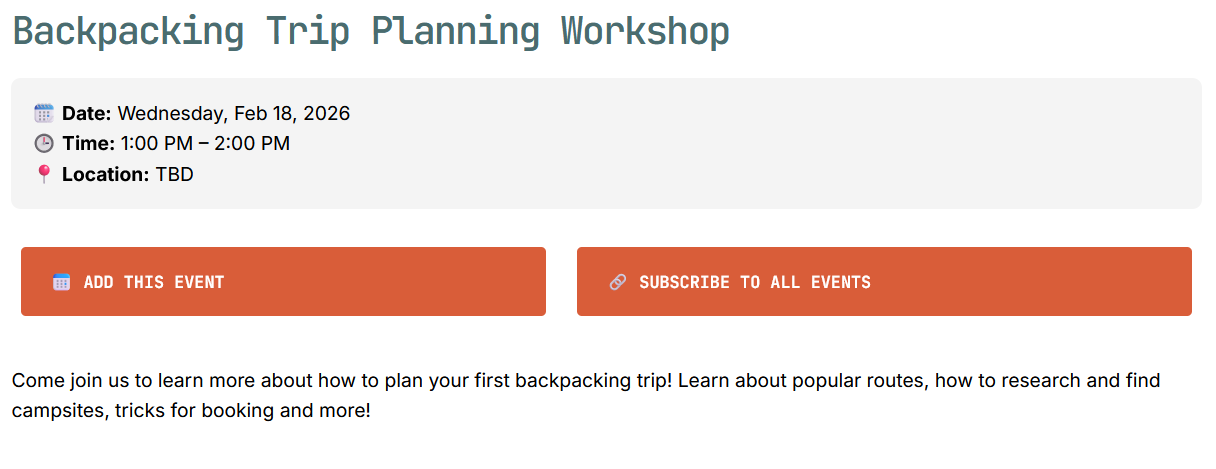
If you really want to get into content modelling with Hugo, you can define section specific layouts for pages within your calendar (the list and the section page) that include UI elements which link to your calendar. In my project, these live at ./layouts/events/list.html and ./layouts/events/single.html Using the webcal:// protocol for the calendar feed link (instead of https://) will prompt users to subscribe to the calendar feed, and they’ll receive updates when their calendar app refreshed the feed from your website.
Here’s how this is looking in my proof of concept:
Repeatability?
The initial build out took about an afternoon of playing around and I think it’s pretty powerful. Refining it took a bit more time, but I’m pretty happy with the results. There’s a real problem with event organizers primarily relying on Instagram and Discord in my area, so hopefully more and more folks will look to tooling like Hugo or Ghost to maintain a presence for their groups and events.
If you’re comfortable with building in Hugo, please feel free to use these layouts in your own site. I’ve tested it with Thunderbird, Google Calendar, and MacOS applications. If there’s enough interest, I can set up a repository that includes templates for an events section on typical Hugo sites.
One thing I’m considering doing with this is creating a playbook: how to create your own blog and event feed for community organizations. Hugo is a little technical, but I think I could make this repeatable for community organizations. If you couple it with Decap/Static/TinaCMS (as a kind of CMS or even Obsidian and Github Desktop), and Github Actions, this becomes a pretty powerful way to run a community site. I still think it might be a bit too technical in the long run, but I’d really like a vibrant collection of local websites that I can tap into using browsers, calendar apps, and RSS readers to distribute information.
If you’re trying to implement this and want to talk about the details, please reach out to me!